Low-Code Automation Platforms Guide: Explore Application Connectivity & Workflow Management
Modern organisations often use multiple software applications to manage customer information, internal communication, documents, finance records, project activities and daily operations. When these applications operate independently, employees may need to transfer information manually, repeat the same tasks or switch between different systems.
Low-code automation platforms help address these challenges by connecting applications and creating automated workflows through visual development tools. Users can configure triggers, actions, conditions and data transfers with limited traditional programming.
These platforms are used for tasks such as processing form submissions, updating customer records, routing approval requests, synchronising information and generating notifications. This guide explains how low-code automation works, the different platform types, application connectivity, workflow management and important implementation considerations.
1. What Are Low-Code Automation Platforms?
Low-code automation platforms are software environments that allow users to design and manage automated processes through visual interfaces, prebuilt components and configurable workflows.
Instead of writing every instruction manually, users can arrange workflow steps, connect applications and define rules using graphical tools. Some platforms also support custom scripts, application programming interfaces (APIs) and advanced configuration for more specialised requirements.
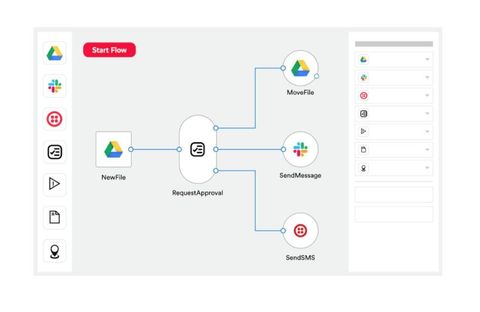
A typical automation may follow this sequence:
A user submits information through an online form.
The platform detects the submission.
The submitted information is transferred to a database or customer management application.
A notification is sent to the appropriate team.
An approval task is created when additional review is required.
The platform coordinates these activities according to the configured workflow.
Low-Code vs No-Code Automation
Low-code and no-code platforms have similar objectives, but they provide different levels of technical flexibility.
| Feature | Low-code automation | No-code automation |
|---|---|---|
| Development approach | Visual tools with optional coding | Primarily visual configuration |
| Technical knowledge | Basic technical understanding may help | Designed for minimal coding knowledge |
| Customisation | Supports scripts and advanced logic | Often relies on predefined options |
| Integrations | Prebuilt and custom connections | Primarily available connectors |
| Typical users | Business analysts, developers and IT teams | Business users and non-technical teams |
The distinction is not always strict. Some platforms provide both low-code and no-code capabilities within the same environment.
2. How Low-Code Automation Works
Most automation platforms use a combination of triggers, actions, conditions, connectors and workflow rules.
Triggers
A trigger is an event that starts an automated workflow. It determines when the platform should begin processing information.
Common triggers include:
A new form submission
An incoming email
A database record being created
A scheduled time or date
A customer record being updated
A notification received from another application
Triggers may operate through application events, scheduled checks or webhooks, depending on the platform.
Actions
Actions are the tasks performed after a workflow starts. They can involve transferring information, creating records, sending messages or updating application settings.
For example, when a customer submits a contact form, an automation may create a new customer record and send a confirmation message.
Conditions and Decision Rules
Conditions allow a workflow to follow different paths depending on the information it receives.
For example, an expense approval workflow may use an amount threshold:
Requests below a defined threshold follow a standard approval route.
Requests above the threshold are sent to a senior reviewer.
Incomplete submissions are returned for additional information.
This approach allows one workflow to handle different situations without requiring separate processes for every possibility.
Workflow Execution
Once the trigger, actions and conditions are configured, the platform executes the workflow. It may also record execution details, report errors and allow authorised users to review completed or unsuccessful tasks.
3. Application Connectivity and Integration Methods
Application connectivity is one of the most important capabilities of low-code automation platforms. It allows different software systems to exchange information and coordinate activities.
Prebuilt Application Connectors
Connectors are predefined components that help platforms communicate with supported applications.
They may provide actions such as creating a record, retrieving information, updating a document or sending a notification.
Common integration categories include:
Customer relationship management systems
Enterprise resource planning applications
Email and communication tools
Cloud storage platforms
Project management software
Online forms and databases
Accounting and reporting applications
Prebuilt connectors can simplify integration because users do not need to develop every connection from the beginning.
Application Programming Interfaces (APIs)
An API provides a structured method for one application to communicate with another. Low-code platforms can use APIs to retrieve information, submit records and perform supported operations.
Common API approaches include:
REST APIs: Use HTTP methods such as GET, POST, PUT and DELETE to interact with application resources.
SOAP APIs: Use structured messages, commonly based on XML, for communication between systems.
GraphQL APIs: Allow applications to request specific data fields through a defined query structure.
API integrations are useful when a required application does not have a suitable prebuilt connector.
Webhooks
Webhooks allow one application to send an event notification to another system when a particular activity occurs.
For example, an online payment application may send a webhook notification when a transaction status changes. An automation platform can receive that notification and initiate another process.
Webhooks can support event-driven workflows without depending entirely on scheduled checks.
Database Connectivity
Some automation platforms connect directly to supported databases or use database connectors to read and update records.
These connections can help synchronise customer information, maintain operational records and transfer information between applications.
Database permissions, data validation and access restrictions should be considered before establishing a connection.
File-Based Integration
Not every application supports direct API connectivity. In some situations, information is exchanged through structured files such as CSV, XML or JSON.
A workflow may detect a new file, extract its contents, validate the information and transfer it into another application.
This method is particularly useful for systems that rely on scheduled data imports and exports.
4. Key Features of Low-Code Automation Platforms
Different platforms provide different capabilities, but several features are commonly used in workflow development and management.
Visual Workflow Designers
A visual workflow designer allows users to arrange tasks through graphical elements. Steps can be connected to represent the order in which activities should occur.
This approach helps users understand process structure and identify missing steps.
Prebuilt Templates
Templates provide starting points for common automation scenarios, including email notifications, document approvals and data synchronisation.
Users can modify the available steps to match their operational requirements.
Conditional Logic and Branching
Branching allows workflows to follow different routes based on defined conditions. It is useful for approvals, customer classification, document reviews and other processes involving multiple outcomes.
Data Mapping and Transformation
Applications may store similar information in different formats. Data mapping connects fields between systems, while transformation adjusts values to match the receiving application's requirements.
For example, a workflow may convert date formats, combine text fields or standardise customer information before transferring it.
Error Handling and Monitoring
Automation platforms may provide execution histories, error notifications, retry mechanisms and workflow status reports.
These features help administrators identify unsuccessful steps and investigate the reasons behind failed integrations.
Access Control and Governance
Organisations may need to control who can create, edit, execute and monitor workflows. Role-based permissions, audit records and environment management can help maintain oversight.
5. Types of Low-Code Automation Platforms
Low-code automation is a broad category that includes several types of platforms. Each type focuses on different integration and process requirements.
Integration Platform as a Service (iPaaS)
iPaaS platforms connect applications, databases and cloud environments through integration workflows.
They are commonly used for data synchronisation, application connectivity and communication between business systems.
Examples include Boomi and MuleSoft Anypoint Platform.
Workflow Automation Platforms
These platforms focus on connecting applications and automating sequences of tasks through triggers, actions and conditional rules.
Examples include Zapier and Make.
They are frequently used for routine activities such as transferring form data, sending notifications and updating records.
Robotic Process Automation (RPA)
RPA platforms automate repetitive activities by interacting with application interfaces, including desktop software and websites.
They can be useful when an older application does not provide suitable APIs or direct integration methods.
Examples include UiPath and Microsoft Power Automate.
Business Process Management (BPM) Platforms
BPM platforms help organisations design, manage and monitor structured business processes.
They may support approval chains, case management, task assignments, process tracking and coordination across departments.
Appian is an example of a platform associated with business process management.
Cloud Workflow Orchestration Platforms
These platforms coordinate tasks across cloud applications, services and infrastructure.
For example, Microsoft Azure Logic Apps supports workflows that connect cloud services, on-premises systems and different application environments.
6. Examples of Low-Code Automation Platforms
Several software platforms provide visual automation, integration or process management capabilities. Their suitability depends on the applications being connected, workflow complexity and organisational requirements.
| Platform | Main capabilities | Common applications |
|---|---|---|
| Microsoft Power Automate | Cloud flows, desktop automation and application connectors | Microsoft 365, approvals and business processes |
| Zapier | Trigger-based workflows and application connectivity | SaaS applications, forms and notifications |
| Make | Visual scenarios, branching and data processing | Multi-step application workflows |
| n8n | Visual workflows, API connections and code extensions | Technical and customised automation |
| Boomi | Enterprise application integration and data connectivity | Cloud and hybrid environments |
| UiPath | Robotic process automation and process orchestration | Desktop and repetitive interface-based tasks |
| Azure Logic Apps | Cloud-based integration and workflow orchestration | Enterprise and hybrid application environments |
| Appian | Business process management and application development | Structured business processes and case management |
These examples represent different categories rather than a universal ranking. Features, supported integrations, hosting options and licensing arrangements vary by product and subscription.
7. Common Business Applications
Low-code automation can be applied to many departments and operational activities.
Customer Relationship Management
When a customer submits a website form, an automation can transfer the information into a customer relationship management system, assign a team member and create a follow-up task.
This helps maintain consistent records across customer communication activities.
Human Resources
Human resource workflows may include employee onboarding, document collection, leave requests and internal approvals.
For example, an approved onboarding workflow can notify relevant departments and create tasks for account setup and document verification.
Finance and Accounting
Automation can coordinate invoice submissions, expense approvals, payment notifications and financial record updates.
Sensitive financial activities should include suitable permissions, verification steps and human review.
Project Management
Project workflows can create tasks when a new project begins, update progress records and notify team members about deadlines.
They can also connect project management applications with communication and document storage systems.
IT Operations
IT teams may use automation to route support requests, classify incidents, notify responsible teams and update ticket records.
More advanced workflows can coordinate system monitoring and account management activities.
E-Commerce Operations
Online retail workflows can connect order information, inventory records, customer notifications and fulfilment applications.
For example, an order status update may trigger a notification and update the associated customer record.
8. Benefits of Low-Code Automation
Low-code automation can support operational improvements when workflows are designed around genuine business requirements.
Reduced repetitive work: Routine activities such as copying information, creating records and sending standard notifications can be automated.
Improved application connectivity: Integrations help different applications exchange information through defined connections.
More consistent processes: Standardised workflows can reduce variations in how routine tasks are performed.
Faster workflow development: Visual builders and preconfigured components can simplify the creation of common automation processes.
Greater process visibility: Execution histories and monitoring features can help teams understand workflow activity.
Flexible customisation: Many platforms combine visual development with APIs, scripts and other technical extensions.
However, automation does not automatically improve every process. Poorly designed workflows can reproduce existing problems more quickly or create additional operational complexity.
9. Challenges and Limitations
Low-code automation platforms have practical limitations that organisations should understand before using them for important operations.
Integration Compatibility
A platform may not support every application or feature required by an organisation. Some connectors may also provide limited access to specific application functions.
Custom APIs or additional development may be necessary.
Data Security and Privacy
Workflows may transfer customer details, financial records, employee information and other sensitive data.
Organisations should review authentication methods, permissions, encryption, data retention and applicable privacy requirements.
Workflow Complexity
Simple workflows are generally easier to manage than processes involving many conditions, connected systems and exceptions.
Complex automation may require technical expertise, documentation and ongoing administration.
Error Handling
A failed application connection, expired credential or unexpected data format can interrupt workflow execution.
Reliable processes should include monitoring, error notifications, retry rules and a suitable method for handling unsuccessful tasks.
Platform Dependency
When workflows rely heavily on one platform, changing providers may require rebuilding connections and transferring automation logic.
Documentation and clear ownership can make future migration easier.
Licensing and Usage Limits
Different platforms may measure usage through tasks, workflow executions, users, operations or other billing units.
Organisations should examine their expected activity levels, connector requirements and licensing conditions before choosing a platform.
10. How to Select a Suitable Low-Code Automation Platform
Choosing a platform should begin with the process that needs improvement rather than the number of features advertised.
Identify the Workflow Requirements
Document the existing process, including its starting event, participants, applications, decision points and expected outcome.
This helps establish which activities are suitable for automation.
Review Application Compatibility
Check whether the platform supports the required applications through prebuilt connectors, APIs, webhooks or database connections.
Connector availability alone may not be enough; verify that the specific operations required by the workflow are supported.
Evaluate Customisation
Consider whether visual configuration is sufficient or whether the process needs custom scripts, API requests and advanced data transformations.
Review Security and Administration
Examine authentication, access permissions, audit records, data protection features and administrative controls.
For enterprise environments, also review development, testing and production environment management.
Test with a Small Workflow
Build a limited proof of concept using realistic sample data. Test normal execution, incorrect inputs, connection failures and recovery procedures.
This provides a clearer understanding of how the platform performs before it becomes part of a larger operational process.
Consider Long-Term Maintenance
Workflows require ongoing attention when connected applications change, credentials expire or business rules are updated.
Assign clear ownership and maintain documentation for important automations.
11. Frequently Asked Questions
1. What is the main purpose of a low-code automation platform?
Its main purpose is to help users create automated workflows and connect applications through visual development tools, configurable logic and optional code.
2. Can low-code platforms connect different software applications?
Yes. They can connect supported applications through prebuilt connectors, APIs, webhooks, database connections and file-based integrations.
3. Is programming knowledge required for low-code automation?
Basic workflows can often be created without extensive programming knowledge. More complex integrations, custom data processing and specialised requirements may need technical skills.
4. What is the difference between workflow automation and RPA?
Workflow automation coordinates tasks, data and application events through defined processes. RPA uses software robots to interact with application interfaces and perform repetitive user actions. Some platforms provide both capabilities.
5. Are low-code automation platforms suitable for large organisations?
Many platforms support enterprise requirements such as centralised administration, access controls, monitoring and integration with cloud or on-premises systems. Suitability depends on workload complexity, security requirements and deployment needs.
Conclusion
Low-code automation platforms provide a structured way to connect applications, transfer information and coordinate repetitive business activities. Their visual workflow designers, connectors, APIs and monitoring features can help organisations manage processes across different software environments.
Selecting a suitable platform requires evaluating application compatibility, workflow complexity, security, error handling and long-term maintenance. A carefully tested workflow with clear ownership is generally a stronger starting point than automating many processes at once.
Disclaimer: This article is intended for general educational and informational purposes. Platform capabilities, integrations, security features and licensing conditions may change. Refer to official product documentation for current technical details.

Related Post...
Low-Code Automation Platforms Guide: Explore Application Connectivity & Workflow Management
Updated: November 17, 2026
Read More
Nitrile O-Rings Guide: Explore Types, Sizes, Properties & Industrial Applications
Updated: November 17, 2026
Read More
System Integration Challenges Guide: Explore Common Problems, Causes & Solutions
Updated: November 17, 2026
Read More