Low-Code Integration Platforms Guide: Explore Features, APIs, Automation & Application
Modern organizations use multiple software applications to manage customer information, finances, inventory, communication, marketing and daily operations. When these applications operate separately, information may become fragmented, repeated data entry can increase, and employees may need to switch between several systems to complete routine tasks.
Low-code integration platforms help address these challenges by providing visual tools to connect applications, exchange information and automate workflows. Instead of developing every connection from the beginning, users can configure prebuilt connectors, map data fields and define workflow rules through graphical interfaces.
These platforms can support both technical developers and business teams. Although many integration tasks require little coding, more advanced workflows may still involve API knowledge, scripting and technical configuration.
This guide explains low-code integration platforms, their main features, API capabilities, automation methods, applications and important selection considerations.
1. What Are Low-Code Integration Platforms?
A low-code integration platform is a software environment that helps connect different applications, databases, cloud systems and business tools through visual development interfaces and configurable components.
Users can create integration workflows by selecting applications, defining triggers, connecting actions and mapping information between systems. The platform handles many technical processes involved in transferring data.
For example, when someone submits an online enquiry form, an integration workflow could:
Receive the submitted information.
Check whether the required fields are complete.
Create a customer record in a CRM application.
Send a notification to the relevant team.
Store the enquiry details in another connected system.
The workflow can be configured visually rather than developed entirely through custom programming.
Low-Code vs No-Code Integration
Low-code and no-code platforms have similar objectives, but they provide different levels of technical flexibility.
| Area | Low-code integration | No-code integration |
|---|---|---|
| Development | Visual tools with optional coding | Primarily visual configuration |
| Technical knowledge | Basic technical understanding may be useful | Often designed for non-developers |
| Customisation | Supports advanced logic and custom components | Usually depends on available features |
| API configuration | May support detailed API configuration | Often uses simplified API connections |
| Best suited for | Developers and technical business teams | Users building simpler workflows |
The distinction is not always strict. Some platforms provide both low-code and no-code capabilities within the same environment.
2. How Low-Code Integration Platforms Work
Most integration platforms follow a sequence of steps to connect applications and execute automated processes.
Application Connection
The first step involves connecting the applications or systems that need to exchange information. Platforms may provide prebuilt connectors for CRM software, accounting tools, databases, cloud storage and communication applications.
These connectors help manage authentication, available actions and communication with the connected application.
Trigger Configuration
A trigger is an event that starts an integration workflow. Common examples include:
A new customer record being created.
An online form being submitted.
An invoice being generated.
A file being uploaded.
An order status being updated.
A scheduled time or date being reached.
Triggers can operate through real-time events, webhooks or scheduled checks, depending on the platform and connected application.
Data Mapping and Transformation
Different applications may store information in different formats. Data mapping connects corresponding fields between systems, while transformation changes information into a format that another application can understand.
For example, one application may store a customer's full name in a single field, while another uses separate first-name and last-name fields.
A transformation step can divide the information into the required format before sending it to the destination application.
Workflow Execution
After the connections and rules are configured, the platform executes the workflow. It may perform several actions, check conditions, repeat tasks or send information to different applications.
Monitoring and Error Handling
Integration platforms generally provide execution histories, error notifications and monitoring tools. These features help teams identify failed connections, authentication problems, missing data and other workflow issues.
3. Important Features of Low-Code Integration Platforms
The features available vary between platforms, but several capabilities are commonly important.
Visual Workflow Builder
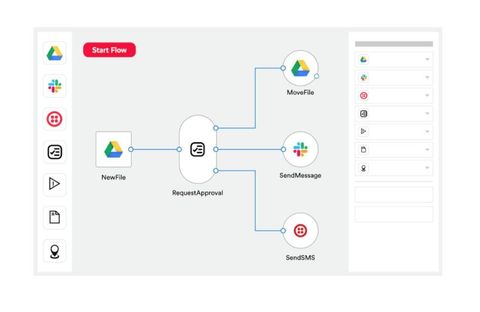
A visual workflow builder allows users to create integration processes through graphical elements such as connected steps, decision points and action blocks.
This approach makes it easier to understand the order in which tasks execute. It can also help teams review and modify workflows without examining large amounts of application code.
Prebuilt Application Connectors
Connectors provide ready-made communication methods for supported applications and systems.
Common connector categories include:
Customer relationship management applications.
Enterprise resource planning systems.
Accounting and finance applications.
Human resource management tools.
Marketing and communication platforms.
Cloud databases and storage systems.
E-commerce and order management applications.
The number of connectors alone does not determine platform suitability. Teams should also check supported actions, authentication methods, connector maintenance and available data operations.
API Integration
Application programming interfaces, commonly called APIs, allow software systems to communicate through defined requests and responses.
Low-code platforms can use APIs to retrieve information, create records, update data and execute operations in connected applications.
Some platforms provide API management features for designing, publishing, securing and monitoring APIs.
Data Transformation
Data transformation helps convert information between different structures and formats. It may include:
Changing date and time formats.
Converting text into numerical values.
Combining or separating fields.
Removing unnecessary information.
Validating required fields.
Mapping records between different databases.
These capabilities are important when connecting applications that use different data structures.
Conditional Logic
Conditional logic allows workflows to follow different paths depending on information or business rules.
For example, an invoice workflow could send an invoice for additional approval when its value exceeds a defined threshold. Other invoices could continue through the standard process.
Scheduling and Event-Based Automation
Platforms may support workflows that start immediately after an event or execute at scheduled intervals.
Event-based workflows are useful for processes that depend on new records or status changes. Scheduled workflows can support periodic data synchronisation, reporting and administrative activities.
Security and Access Management
Integration platforms may handle sensitive business information, so security features are essential.
Common capabilities include:
Authentication and access controls.
Role-based permissions.
Credential and secret management.
Encryption during data transfer.
Audit logs and activity records.
Environment separation for development and production.
Monitoring of integration activity.
Organisations should review the platform's security documentation and confirm that its controls meet their internal and regulatory requirements.
4. Understanding APIs in Low-Code Integration
APIs are an important part of application integration because they provide structured ways for different software systems to exchange information.
Low-code platforms often simplify API usage through visual configuration, reusable connectors and built-in authentication options.
REST APIs
REST APIs commonly use HTTP methods to interact with application resources.
Typical methods include:
GET: Retrieve information.
POST: Create or submit information.
PUT: Replace or update a resource.
PATCH: Modify selected fields.
DELETE: Remove a resource.
REST APIs are widely used in web applications, cloud software and business systems.
SOAP APIs
SOAP is a protocol that uses structured XML messages for communication between systems. It is often found in established enterprise applications and environments with formal messaging requirements.
Some low-code platforms provide connectors or configuration tools for working with SOAP-based systems.
GraphQL APIs
GraphQL allows applications to request specific fields from a data source. Instead of receiving a fixed response structure, a client can define the information required for a particular operation.
It can be useful when applications need flexible access to related data.
Webhooks
Webhooks allow one application to send information to another when a particular event occurs.
For example, a payment application may send a webhook notification when a transaction status changes. An integration platform can receive that notification and start another workflow.
Webhooks can reduce the need for repeated scheduled checks, although delivery, authentication and retry behaviour should be configured carefully.
5. Common Applications of Low-Code Integration Platforms
Low-code integration platforms can support processes across several business functions.
Customer Relationship Management
CRM integration connects customer records with other applications used by sales, support and marketing teams.
Possible workflows include:
Creating CRM records from website enquiries.
Updating customer details across connected applications.
Sending notifications when a lead changes status.
Synchronising customer activity with reporting tools.
Enterprise Resource Planning
ERP systems manage areas such as inventory, finance, procurement and production. Integration platforms can connect ERP software with e-commerce applications, warehouse systems and accounting tools.
For example, a confirmed order may update inventory information and initiate a fulfilment workflow.
E-Commerce Operations
Online retail businesses may use separate applications for order management, inventory, payments, customer communication and shipping.
Integration workflows can connect these systems so that order information moves between them according to defined rules.
Human Resources
HR integration can connect recruitment, employee records, payroll and attendance applications.
Examples include creating an employee record after onboarding approval, updating department information and sending notifications when an employee status changes.
Finance and Accounting
Integration platforms can transfer invoice information, payment notifications and financial records between applications.
Approval workflows can also be configured for expenses, invoices and other financial processes. Financial records should be validated carefully to avoid duplicate entries or incorrect updates.
Marketing and Communication
Marketing teams may connect email applications, customer databases, website forms and campaign management tools.
These integrations can help maintain consistent contact information and coordinate communication activities across different systems.
Data and Business Reporting
Integration platforms can collect information from multiple sources and send it to databases, data warehouses or reporting applications.
This can help organisations prepare consolidated reports and monitor business activities across different departments.
6. Examples of Low-Code Integration Platforms
Different platforms focus on different integration requirements. Some are designed for simple application-to-application workflows, while others support enterprise-wide integration, API management and complex automation.
The following examples illustrate different approaches rather than representing a ranking.
Microsoft Power Automate
Microsoft Power Automate provides visual workflow automation and integration capabilities across Microsoft applications and supported third-party systems.
It can be used to create workflows involving Outlook, SharePoint, Teams, Excel and other connected applications. Desktop flows also support certain repetitive tasks involving desktop software.
Official documentation: https://learn.microsoft.com/en-us/power-automate/
Boomi
Boomi provides integration capabilities for connecting applications, data sources and business systems. Its platform includes tools for integration development, API management and workflow automation.
It can be relevant to organisations managing multiple cloud and enterprise applications.
Official website: https://boomi.com/
Workato
Workato provides automation and integration capabilities through configurable workflows, connectors and reusable components. Its platform supports connections across business applications, databases and cloud or on-premises systems.
It also provides options for custom connector development and more advanced workflow logic.
Official documentation: https://docs.workato.com/en/process-automation
MuleSoft Anypoint Platform
MuleSoft Anypoint Platform focuses on application integration and API management. It provides tools for designing, developing, managing and monitoring APIs and integrations.
Its capabilities can support organisations with more complex integration architectures and reusable API requirements.
Official website: https://www.mulesoft.com/platform/anypoint-platform
Zapier
Zapier provides visual automation workflows that connect a broad range of online applications. Its workflows use triggers and actions to perform tasks across connected tools.
It is commonly associated with straightforward application-to-application automation and business productivity workflows.
Official website: https://zapier.com/
7. Benefits of Low-Code Integration Platforms
Low-code integration platforms can provide several operational advantages when selected and configured appropriately.
Reduced Development Complexity
Prebuilt connectors and visual workflow builders can reduce the amount of custom integration code required for supported applications.
This can make routine integration projects more accessible to teams with different technical backgrounds.
Improved Data Consistency
When information is transferred through properly configured workflows, connected applications can maintain more consistent records.
Validation and transformation rules can also reduce errors caused by manual data entry.
Workflow Automation
Repeated activities can be automated through triggers, conditions and actions. Employees may then spend less time on routine administrative tasks and more time on activities requiring human judgement.
Easier Workflow Maintenance
Visual workflow designs can make it easier to understand how a process operates. Teams can review individual steps and adjust rules when business requirements change.
However, complex workflows still require documentation, testing and technical oversight.
Support for Business Growth
Integration platforms can help organisations connect additional applications as their technology requirements change. The ability to reuse connectors and workflow components may also simplify future integration projects.
8. Challenges and Limitations
Despite their capabilities, low-code integration platforms are not suitable for every integration requirement.
Connector Limitations
A platform may not support every feature of a connected application. Some connectors may provide only a limited set of actions or may not support particular data fields.
Custom API configuration or connector development may be required.
Complex Data Structures
Advanced integrations involving large datasets, complicated relationships or specialised transformation rules can require technical expertise.
Visual development tools may become difficult to manage when workflows contain too many interconnected steps.
API Rate Limits
Applications often restrict the number of API requests that can be made within a particular period. High-volume workflows may reach these limits and require scheduling, batching or retry mechanisms.
Data Security and Privacy
Connecting multiple applications creates additional points where information is transferred and processed. Poorly configured permissions or credentials can expose business data.
Security reviews, access controls and monitoring should be included in integration planning.
Platform Dependency
Workflows may depend on platform-specific connectors, data structures and configuration methods. Moving to another integration platform can require redesigning and testing existing workflows.
Monitoring and Maintenance
Integrations may fail when an application changes its API, credentials expire or data formats are modified. Continuous monitoring and periodic testing are therefore important.
9. How to Select a Suitable Low-Code Integration Platform
Selecting a platform should begin with the organisation's integration requirements rather than the number of advertised features.
Identify the Applications to Connect
Prepare a list of the applications, databases and systems that need to exchange information. Confirm whether the platform supports the required connectors and specific operations.
Understand Workflow Complexity
Determine whether the intended processes involve simple data transfers or more advanced logic such as conditional routing, loops, parallel actions and multi-stage approvals.
Review API Capabilities
Check support for REST, SOAP, GraphQL, webhooks and custom API connections where relevant. Authentication methods, request limits and data transformation features should also be reviewed.
Evaluate Security Requirements
Examine access controls, encryption, credential management, audit logging, data residency and compliance documentation. Requirements may differ depending on the type of information being processed.
Check Scalability and Monitoring
Consider expected workflow volume, execution frequency, data size and the number of connected applications. Monitoring, error recovery and performance reporting are important for long-running integrations.
Test Before Wider Deployment
Start with a small workflow that represents a real business process. Test normal execution, incorrect inputs, duplicate events, API failures and recovery procedures before expanding the integration.
10. Frequently Asked Questions
1. What is a low-code integration platform used for?
It is used to connect applications, databases and business systems through visual workflows, configurable connectors and API integrations. It can also automate data transfers and repeated business processes.
2. Do low-code integration platforms require programming knowledge?
Basic workflows can often be created without extensive programming knowledge. However, advanced API configurations, custom connectors, complex transformations and troubleshooting may require technical skills.
3. What is the difference between an API and an integration platform?
An API provides a defined way for software systems to communicate. An integration platform uses APIs, connectors and other communication methods to connect applications and coordinate workflows.
4. Can low-code platforms connect cloud and on-premises applications?
Many integration platforms support both cloud-based and on-premises systems. The available methods may include connectors, secure agents, gateways and API connections.
5. Are low-code integration platforms suitable for large organisations?
They can support enterprise integration requirements, depending on their architecture, security controls, scalability, governance and monitoring capabilities. Large organisations may still need developers and integration specialists for complex environments.
Conclusion
Low-code integration platforms help organisations connect applications, exchange data and automate workflows through visual development tools and configurable components. Their capabilities can include prebuilt connectors, API integration, data transformation, conditional logic, workflow monitoring and security controls.
They can support processes across CRM, ERP, finance, human resources, e-commerce, marketing and business reporting. However, platform selection should consider application compatibility, API requirements, workflow complexity, data protection and long-term maintenance.
A clear understanding of these factors can help organisations plan integration projects and build more connected software environments.
Disclaimer: This article is intended for general educational and informational purposes. Platform capabilities, connector availability and technical requirements may vary by provider, product version and deployment environment

Related Post...

Enterprise B2B CRM Explained: Learn the Basics, Features, Benefits, and Best Practice
Updated: November 13, 2026
Read More
Low-Code Automation Platforms Guide: Explore Application Connectivity & Workflow Managements
Updated: November 17, 2026
Read More
Low-Code Integration Platforms Guide: Explore Features, APIs, Automation & Applications
Updated: November 17, 2026
Read More